
Baby Tracker: Pregnancy App
Imgori LLCParenting
0.00.00 Reviews
- Version
- 11.0.0
- Installs
- 500.00K
- Age Rating
- Everyone
Screenshots


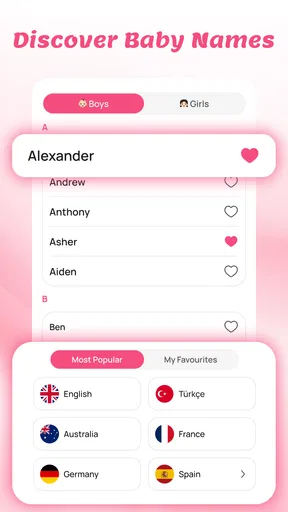
Our Review of Baby Tracker: Pregnancy App
 Analysis by Appyee
Pregnancy apps can be comforting, but they can also become noisy collections of reminders, articles, and counters that I stop opening after a few days. Baby Tracker: Pregnancy App takes a more focused approach around following the baby’s growth, reading pregnancy guidance, and keeping a daily record. I found that combination useful because it gives the app two jobs: it can answer a quick question when I have a spare minute, and it can also become a personal timeline of the pregnancy.
Developed by Imgori LLC, this free parenting app is aimed at an Everyone audience and runs on Android 7.0 or later. It has passed the 50K-install mark, which makes it a smaller, more personal-feeling option than the biggest pregnancy platforms. The current release is version 4.0.0, and optional purchases range from $6.99 to $14.99 per item. Those details matter because the basic cost is easy to approach, while the paid extras deserve a little thought before you commit to them.
What the app feels like in everyday use
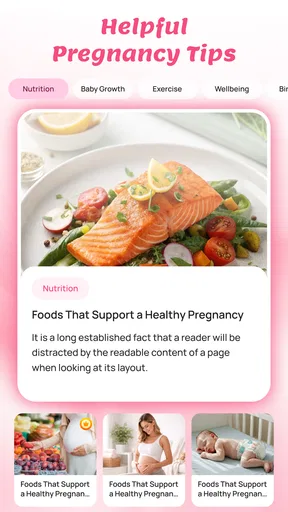
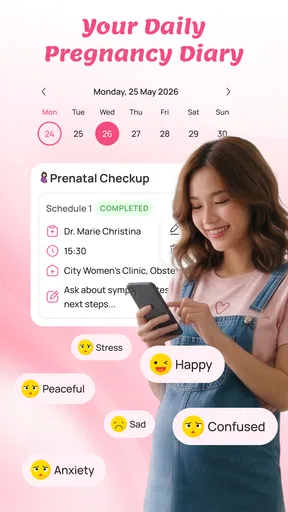
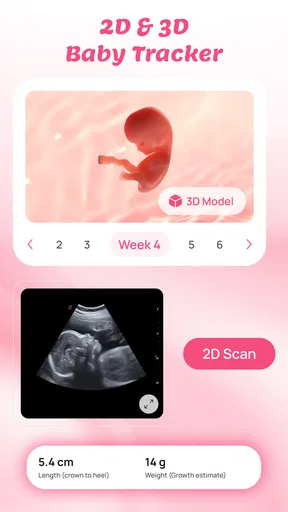
My first impression is that the app works best when I treat it as a lightweight companion rather than a medical authority. The growth tracking gives the pregnancy a sense of progression, while the tips provide short prompts for learning and preparation. The daily diary adds the most personal value. Instead of only consuming information, I can leave behind notes about how I felt, what changed, or what I wanted to ask at an appointment.
That distinction is important. Many alternatives concentrate on a calendar, due-date calculations, or large libraries of content. Baby Tracker: Pregnancy App is more appealing if I want those familiar pregnancy tools alongside a record that feels like my own. I would not choose it solely for clinical guidance, and I would not use its educational material to replace advice from a doctor or midwife. I see it as a way to organize everyday observations and questions before a professional conversation.
The app’s three-part focus also makes it suitable for different moments. Growth information works well when I want a quick check-in. Tips are better when I have time to read and think. The diary is most useful when something happens that I do not want to forget. Keeping these purposes separate helps prevent the experience from becoming one long stream of generic content.
Why the diary matters more than it first appears
A daily diary can sound like a simple note-taking feature, but its value depends on how deliberately I use it. I would avoid writing only “fine” or “tired,” because those entries become difficult to interpret later. A better routine is to record one physical observation, one emotional detail, and one question. For example, after a busy day I might note unusual discomfort, my energy level, and whether I want to ask about sleep or movement at my next visit.
This creates a practical bridge between the app and real healthcare conversations. I can look back at patterns instead of relying on memory, especially when appointments are short and pregnancy makes individual days blur together. The diary is also useful for sharing selected experiences with a partner, although I would still be careful about treating personal notes as a complete health record.
There is a trade-off here: the more personal the diary becomes, the more important it is to think about who may see the phone and how comfortable I am storing sensitive thoughts in an app. I would keep entries factual when they might be useful during an appointment and avoid putting anything into the diary that I would not want retained on a personal device.
Using it when the phone is not in an ideal setting
Pregnancy rarely fits a neat schedule. I might open the app in a waiting room, on public transport, during a lunch break, or late at night when I remember something I wanted to record. These short sessions favor the app’s compact functions: checking a growth update, reading a small piece of advice, or making a quick diary entry instead of trying to complete a long planning session.
Connectivity shapes these moments. Any feature that needs fresh content or a live connection may be less convenient when reception is weak, mobile data is limited, or I am trying to avoid using data while traveling. I would therefore make a habit of opening the app when I have a reliable connection and leaving enough time for content to load. I would not assume that every part of the experience works without a network, so I would avoid depending on it as the only place for information needed urgently.
This is especially relevant during appointments. If I want to refer to a diary note or a tip, I would check it beforehand rather than waiting until I am sitting in a clinic with poor reception. That small habit reduces friction and keeps the app in its proper role: preparation and reflection, not emergency access.
A realistic routine for a busy day
Imagine a weekday when I wake up tired, work through the morning, and have an appointment after lunch. I could spend a minute reviewing the growth section, then add a diary note about sleep, appetite, or a symptom I noticed. Before leaving home, I would reread the note and turn it into a short question for the appointment. Later, I might return to the tips section when I have a quieter moment.
That workflow is more useful than opening the app repeatedly without a purpose. It also avoids a common problem with pregnancy trackers: becoming absorbed in daily comparisons and forgetting the reason for using the information. I would use the growth updates as context, not as a test I need to pass. Every pregnancy is different, and an app cannot interpret an individual situation with the care of a qualified professional.
For a partner, the app can provide an easy conversation starter. Sharing a tip or discussing a diary entry may make the pregnancy feel less like something happening only to the pregnant person. Still, I would not expect the app to replace direct communication. The diary is personal first, and sharing should happen only when it feels comfortable.
What happens when the connection fails
The most frustrating interruption is not necessarily a crash. It is opening an app for a quick answer and finding that the relevant content is slow to appear or unavailable because the connection is unstable. Baby Tracker: Pregnancy App is best approached with a little preparation. If I know I will be traveling, attending an appointment, or spending time somewhere with unreliable reception, I would review anything important before leaving.
I would also keep essential information in a separate place. Appointment details, medication instructions, urgent contact information, and medical advice belong in the channels provided by healthcare professionals, not solely inside a pregnancy app. The diary can help me remember what to discuss, but it should not become the only record of something clinically important.
When an interruption happens during a diary session, I would avoid repeatedly tapping buttons or assuming that an entry was saved. I would check whether the note is visible after the connection returns and, for anything important, keep a short backup note elsewhere until I know it is safely recorded. This is a small inconvenience, but it is a sensible habit for any app handling personal memories or health-related observations.
There is another kind of failure to watch for: information overload. Even when the connection is perfect, too many tips can make me feel that I am constantly behind. I would set a narrow purpose for each visit and stop once I have found what I need. The app becomes calmer when I use it as a reference and diary instead of treating every update as an instruction.
Privacy-minded habits make the experience better
Pregnancy notes can include intimate symptoms, worries, appointment questions, and family details. I would therefore use the app with the same care I apply to any personal journal. I would avoid recording unnecessary identifying information, especially if a note is only meant to remind me of a general question. A simple entry such as “ask about recurring discomfort” may be enough to trigger a useful conversation without creating an overly detailed digital record.
I would also review the app’s access and purchase screens carefully rather than accepting every prompt automatically. The app is free to start, but optional in-app items sit between $6.99 and $14.99 each. That does not make the app poor value, but it means I would first use the core experience and decide whether an extra genuinely improves my routine. A paid addition is easier to judge after I know whether I will actually maintain the diary.
Connectivity adds another privacy consideration. When I am on public Wi-Fi, I prefer to postpone sensitive diary work until I am on a connection I trust. I would also keep my phone protected with a lock screen and avoid leaving personal entries open where someone else can read them. These are not dramatic steps, but they fit the kind of information the app encourages me to store.
Parents and expectant parents often share devices, so this point deserves attention. If a partner or family member regularly uses the same phone, I would think carefully before writing anything highly private. The diary is valuable precisely because it can become personal, but that benefit comes with a responsibility to manage the device and the content thoughtfully.
How it compares with familiar pregnancy alternatives
The usual alternatives tend to fall into a few groups. Some are mainly due-date calculators and weekly development guides. Others emphasize symptom logging, appointment planning, community discussion, or large educational libraries. Baby Tracker: Pregnancy App sits closer to the middle: it combines growth tracking, tips, and a diary without making one of those elements the entire identity of the experience.
I would choose a more specialized tracker if I needed detailed monitoring built around a particular medical instruction or a narrowly defined routine. I would also look elsewhere if community conversation were my main reason for installing an app. On the other hand, someone who wants a personal record but does not want to manage several separate tools may appreciate this combination.
The smaller install footprint can be a positive for people who prefer a less crowded option, although popularity alone should not decide a health-related download. What matters more is whether the app’s approach matches the way I think. If I like short check-ins and personal notes, the structure makes sense. If I want extensive customization, deep analytics, or a highly social experience, another category of app may be a better fit.
The free entry point also makes comparison easier. I can try the basic workflow before considering an optional purchase, rather than paying immediately for a complete package. I would judge value by consistency: if the app helps me remember questions, understand the pregnancy journey, and maintain a diary over time, it earns a place on my phone. If I only open it once a week out of obligation, the extras are unlikely to change that.
Who will benefit, and who should skip it
I think the app is a good match for someone who wants a gentle daily routine rather than a demanding health dashboard. It suits first-time parents who enjoy learning in small pieces, expectant parents who want a chronological record, and couples looking for prompts to discuss how the pregnancy is progressing. It can also help anyone who tends to forget questions between appointments.
I would be more cautious recommending it to a person who needs a medically supervised monitoring system, highly detailed symptom analysis, or guaranteed access in places with unreliable reception. I would also skip it if I knew I would never write diary entries. In that case, the app’s most distinctive element would go unused, and a simpler growth guide might be more practical.
People who dislike recurring reminders or pregnancy content that encourages constant checking may also find the format tiring. My advice would be to create a limited routine: one brief check-in, one useful note, and no pressure to consume everything. The app should support confidence, not create another daily obligation.
My final view on staying connected with the app
Baby Tracker: Pregnancy App works because it connects information with memory. The growth section gives structure, the tips provide moments of learning, and the diary turns an otherwise temporary experience into something I can revisit. I especially like the idea of using it before appointments: write a concise note, review it when the connection is dependable, and bring the resulting questions to a professional.
Its limitations are equally clear. I would not rely on it for urgent medical decisions, assume that every function is available without a network, or store every sensitive detail without considering device privacy. The optional purchases also mean I would test my own usage before spending more. Those are reasonable boundaries, not reasons to dismiss the app.
For a free parenting app from Imgori LLC, it offers a focused blend that is easy to understand and potentially useful over many months. The best results come from intentional use: check the growth information for context, read tips selectively, and make diary entries specific enough to help later. The strongest reason to install it is not simply tracking pregnancy, but turning scattered daily experiences into an organized record.
If that sounds like the kind of support I would actually use, this app is worth trying on a compatible Android device. If I need comprehensive clinical monitoring, a strong social community, or dependable access in disconnected locations, I would choose a more specialized alternative instead. My connectivity verdict is positive but practical: use it while connected, prepare important information in advance, and keep medical decisions firmly with healthcare professionals.
Privacy and Permissions
See what permissions an app requests and how it handles your data.
- Wi-Fi connection information
- view Wi-Fi connections
- Other
- view network connections, connect and disconnect from Wi-Fi, full network access, run at startup, control vibration, prevent device from sleeping, Google Play license check
Verdict
Strengths of Baby Tracker: Pregnancy App
- Clear week-by-week pregnancy tracking for quick progress updates.
- Helpful reminders for appointments, vitamins, and important pregnancy tasks.
- Includes useful checklists for preparing the hospital bag and baby essentials.
- Simple interface makes daily logging easy, even for first-time parents.
- Supports sharing pregnancy information with a partner or family member.
Limitations of Baby Tracker: Pregnancy App
- Some advanced features may require a premium subscription.
- Content may feel generalized and not replace personalized medical advice.
- Frequent notifications can become distracting if not customized.
- Data entry may feel repetitive during long-term daily use.
- Privacy settings and data handling should be reviewed before recording sensitive details.
Other Releases by Imgori LLC
View All
Live TV - TV Shows & Movies
Video Players & Editors4.3
Similar Picks in This Category
View All
Family Space
Motorola Mobility LLC.3.9

شرطة الأطفال - مكالمة وهمية
Oub Apps4.1

Findmykids: Parental Control
LETEM LTD4.6

Pregnancy + | Tracker App
Philips Electronics UK Limited4.8

Policía de niños - para padres
Kids police4.7

Pregnancy App
Amila4.9
Frequently Asked Questions
What is Baby Tracker: Pregnancy App used for?
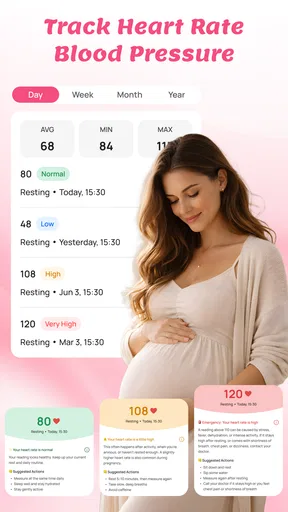
Baby Tracker: Pregnancy App is designed to help expectant parents follow pregnancy progress in one place. It may provide week-by-week information about fetal development, pregnancy milestones, appointment planning, symptom notes, weight tracking, kick counting, and other useful tools. It is best viewed as an organizational and educational companion rather than a replacement for professional prenatal care.
Is Baby Tracker: Pregnancy App accurate enough for medical decisions?
The app can be useful for general pregnancy information, reminders, and personal tracking, but its content should not be treated as a diagnosis or medical prescription. Pregnancy development varies from person to person, and estimated dates or milestone information may not apply exactly to every pregnancy. Always confirm concerns, symptoms, test results, and treatment decisions with a qualified healthcare professional.
What information do I need to enter to use the app?
Most pregnancy-tracking features typically require details such as the first day of your last menstrual period, estimated due date, pregnancy stage, or information supplied by your healthcare provider. You may also be able to record symptoms, appointments, weight, baby movements, and personal notes. Avoid entering information you are uncomfortable sharing, and review permissions and privacy settings before creating an account.
Can the app track appointments, symptoms, and baby movements?
Baby Tracker: Pregnancy App may include practical tracking tools for appointments, symptoms, weight changes, contractions, or fetal movement, depending on the version and device platform. These features can make it easier to organize information for prenatal visits and notice patterns over time. However, tracking results are not a substitute for urgent medical assessment, especially if movements decrease or concerning symptoms appear.
Is Baby Tracker: Pregnancy App free to download, and are there in-app purchases?
The application may be available as a free download, but some features, articles, personalization options, or advanced tracking tools can require in-app purchases or a subscription. Pricing and included features may differ between Android and iOS and can change after updates. Before downloading or starting a trial, check the store listing, renewal terms, cancellation process, advertisements, and privacy policy carefully.
